Optix Mag273R Review: Real User Experience After 3 Months
I've been using the Optix Mag273R as my primary monitor for the past three months. I bought it because I wanted a 27-inch panel that could handle a mix of work, photo editing, and a fair amount of gaming without breaking the bank. What I found was a monitor that is very capable in some areas and frustrating in others — the kind of product that forces you to weigh priorities instead of delivering across the board.
Why I picked the Mag273R
When I bought it, I was looking for a 27-inch monitor with a high refresh rate, reasonable color performance, and a stand that didn't make my desk feel like a tech museum of clamps and risers. I wanted something that would be a clear upgrade over my old 60Hz screen for gaming, but that wouldn't require me to re-think my entire workstation setup. I also wanted good value for the money — not ultra-premium, but not entry-level either.
First impressions and build quality
Out of the box the Mag273R felt solid. The bezel is thin enough for a modern look, and the plastic finish is textured where it needs to be to avoid looking cheap. The assembly was straightforward: attach the base, plug in the stand, and you're done. The stand gives you tilt, height, and swivel adjustments — nothing exotic like pivot to portrait, but everything I used daily was available.
One specific thing I appreciated was the cable management slot in the stand. I've noticed that small conveniences like that matter after a couple of weeks of use when your desk starts to accumulate HDMI and power cables. The one thing that bothered me visually was the glossy logo area on the back; it shows fingerprints easily and collects dust, which annoyed me more than it should in a product at this price tier.
Performance: daily work and productivity
For everyday tasks — web browsing, document editing, spreadsheets — the Mag273R performed well. The 27-inch size gives me a comfortable desktop real estate without the need for scaling for most productivity apps. Text is sharp, windows fit nicely side-by-side, and I didn't feel the need to constantly change scaling settings.
In my experience, the ergonomics are where this monitor earns real points. I use two main positions throughout the day: a slightly lowered position for focused writing and a slightly higher one when I'm referencing materials. The stand makes switching between these positions easy, and the tilt/hight range covered my needs.
Color, contrast, and panel characteristics
I noticed that colors out of the box are punchy but a touch oversaturated. After a quick calibration with a simple software profile and my eye, skin tones and neutral grays looked more natural. If you're into color-critical work, you'll probably want to spend 10–20 minutes calibrating this panel — and be aware that it won't match a professional-grade wide-gamut monitor.
One thing I found was moderate backlight uniformity. In normal daytime use I rarely saw issues, but in dim content (watching a dark movie or working with dark backgrounds) there was a subtle, uneven glow toward the corners. It's not severe enough to ruin the experience, but if you frequently work with low-light content it might be noticeable.
Find top-rated Electronics products at great prices.
Shop Amazon →Gaming and motion handling
Gaming is where the Mag273R shines for me. The high refresh rate made a very visible difference after switching from 60Hz — mouse movement and animations feel far smoother and more responsive. Frame pacing was consistent in the titles I play (I primarily tested with first-person shooters and some fast-paced RPGs).
Adaptive sync support meant I could play without tearing at mid-range frame rates. I noticed reduced stutter and a general improvement in perceived fluidity. Input lag felt low — I didn't run professional lag tests, but my experience competing in online matches didn't show any disadvantage from the monitor. That said, the absolute fastest e-sports players might still prefer top-tier panels with specialized low-lag modes.
OSD, features, and connectivity
The on-screen display (OSD) is straightforward but somewhat clunky to navigate with the joystick control. The menus include several presets (FPS, Racing, Reader), a crosshair overlay, and basic color and gamma adjustments. I used the "User" mode after tuning brightness/contrast and color temperature — that gave me the most natural results.
Connectivity is adequate: you'll find DisplayPort, HDMI inputs, and a headphone jack on the back. There's no integrated USB hub on my unit, which I missed because I have a pair of peripherals that I like to keep plugged into the display for neatness. If you rely on an all-in-one monitor hub, bear that in mind.
What I liked the most
- Responsive, high-refresh experience that transformed everyday gaming.
- Comfortable ergonomic range that suited my varied workflow positions.
- Solid build quality for the price — it feels like it will last.
- Easy, useful OSD presets for quickly switching modes depending on what I'm doing.
What disappointed me
- Color calibration out of the box was a little aggressive; required manual tuning for accurate skin tones.
- Backlight uniformity is okay but not excellent in dim scenes.
- No built-in USB hub — a small omission that affects desk tidiness.
- OSD joystick is fiddly at times; menus could be better organized.
Pros & Cons
- Pros:
- High refresh rate feels very fluid in games and UI interactions
- Comfortable ergonomics with practical cable management
- Good value for a 27-inch performance-oriented monitor
- Sturdy build and simple, modern aesthetic
- Cons:
- Colors need calibration for accurate work
- Some backlight unevenness in dark scenes
- Missing USB hub and limited port options for power users
- OSD navigation can be slow and unintuitive
Comparison: How the Mag273R stacks up
| Feature | Optix Mag273R (my unit) | Common competitor: Mid-range 27" 1440p | Common competitor: 27" color-focused monitor |
|---|---|---|---|
| Screen size | 27-inch | 27-inch | 27-inch |
| Refresh rate | High refresh (noticeably smoother than 60Hz) | Often 144Hz (good balance) | Often 60–144Hz (more color focus) |
| Color out of box | Punchy, needs calibration | Usually balanced, some require tuning | Generally better factory calibration |
| Ergonomics | Tilt, height, swivel — practical | Varies (some cheaper models lack swivel) | Often premium stands with more range |
| Ports | DisplayPort, HDMI, audio out | Similar set; some include USB hub | Often include USB hub and additional inputs |
| Best for | Gamers who also do everyday productivity | Gamers wanting higher resolution vs FPS tradeoff | Content creators and photographers |
Buying guide — should you get the Mag273R?
Here's how I think about the decision based on three months of daily use:
Consider this monitor if...
- You've been using a 60Hz display and want a noticeable, affordable upgrade to smoother motion for gaming and UI responsiveness.
- You need a reliable 27-inch screen for mixed use: office work in the morning, gaming in the evening, occasional creative work on weekends.
- You appreciate adjustable ergonomics out of the box and want a decent-looking monitor without spending on premium materials.
- You don't require factory-perfect color accuracy or deep local dimming for HDR content.
Look elsewhere if...
- You do color-critical work (photography, print design) and require a wide-gamut display with excellent factory calibration.
- You want absolute top-tier HDR performance with full-array local dimming — this monitor won't compete with high-end HDR panels.
- You need lots of extra connectivity built into the monitor like multiple USB-A/USB-C ports and an integrated KVM.
Questions to ask before buying
- Will you prioritize frame rate over resolution? If you value the smoothest motion for competitive gaming, a high-refresh 1080p or 1440p panel makes sense. I found this monitor leaned toward that priority.
- Do you plan to calibrate? If yes, factor that into your expectations out of the box. Calibration improved the Mag273R notably for me.
- Will you use it in a dark room often? If so, look closely at backlight uniformity reviews — my unit showed mild corner glow in low-light scenes.
- Do you need USB passthrough? If your desk setup relies on monitor hubs, the lack of a built-in USB hub is worth noting.
Real-world scenarios from my experience
Here are a few concrete use cases I tested over the last three months and what I found.
Work: writing, spreadsheets, and long sessions
For writing and spreadsheets, the panel size and ergonomics were a net positive. I went from feeling cramped on a 24-inch 60Hz display to having comfortable screen real estate. The adjustable height and tilt helped reduce neck strain over long sessions, which was a real win for me.
Looking for the best Electronics deals on Amazon?
View Offers →Casual and competitive gaming
Playing both single-player and competitive multiplayer games, the difference was obvious. The higher refresh rate made camera pans and aim feel smoother and more responsive. I did notice that in fast dark scenes (think shadowy corridors), the slight backlight inconsistency and lack of deep HDR meant I couldn't rely on the display for the deepest blacks, but overall gameplay was fast and enjoyable.
Streaming and media consumption
Watching streamed shows and YouTube content looked fine, but not reference-level. Colors were vibrant and pop nicely, but dark scenes occasionally showed the backlight fall-off. For casual viewing it's perfectly fine; for cinephiles chasing the deepest blacks, it's not going to replace a proper OLED or a monitor with strong local dimming.
Final thoughts and conclusion
After using the Optix Mag273R for three months, I feel comfortable calling it a solid all-rounder for users who want better-than-basic performance without paying premium prices. In my experience, its strongest point is the high-refresh experience combined with practical ergonomics — that combination made my day-to-day computing feel faster and more pleasant.
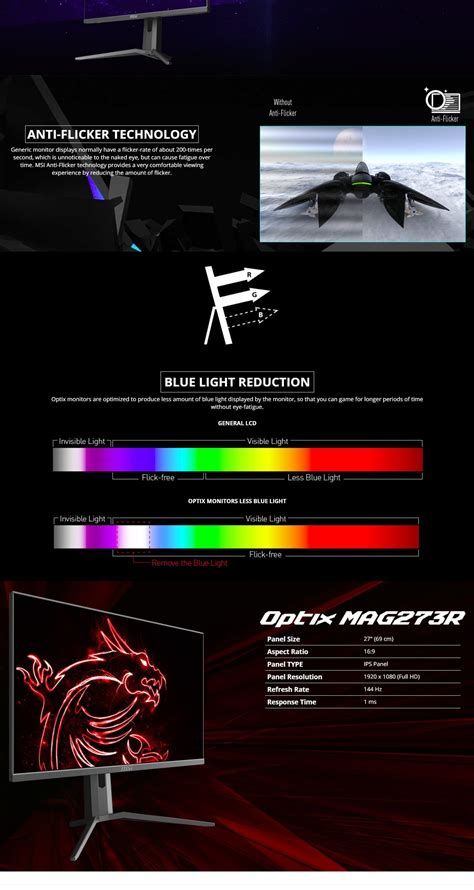
What I appreciated most was the tangible upgrade in smoothness for both gaming and general UI interactions. What bothered me, and ultimately kept this from being a standout, were the color calibration needs and the subtle backlight uniformity issues in dim scenes. Those are things you can live with, and in my case I mitigated them with a quick calibration and environmental adjustments, but they're worth noting if you expect near-perfect out-of-the-box color or deep HDR performance.
In short: if you want a 27-inch monitor that feels snappy, has good ergonomics, and gives you a very enjoyable gaming experience without a professional-level price tag, the Mag273R is worth considering. If your priorities are exact color accuracy, top-tier HDR, or an integrated USB hub, you may want to compare other models that target those specific needs.