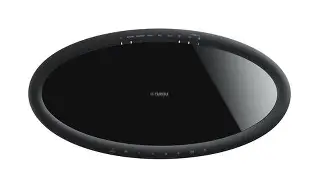
Don't Buy the Musiccast 50 Until You Read This Full Analysis
Introduction
The Yamaha MusicCast 50 has been marketed as a versatile, high-quality wireless speaker for modern home audio. It promises multi-room streaming, smart assistant compatibility, and the convenience of a single-speaker solution for much of a living space. However, buyers often care about more than marketing claims: how it sounds in a real environment, how reliable the app and network features are, how it integrates with existing gear, and whether it offers good long-term value for the intended use case.
This article offers an independent, detailed analysis of the MusicCast 50 from the perspective of real-world users: apartment dwellers, audiophiles on a modest budget, families who want multiroom music, and people looking for a compact all-in-one speaker for a small to medium-sized room. The goal is to provide the information needed to decide whether the MusicCast 50 is the right purchase — or whether another option would better meet expectations.
Overview: What the MusicCast 50 Is and Who It's For
The MusicCast 50 is a networked wireless speaker built around Yamaha's MusicCast multiroom platform. It targets buyers who want:
- Multiroom audio that is simple to expand
- Compatibility with common streaming services and protocols
- A single-box solution that can act as a standalone speaker or part of a multi-speaker system
- Decent sound quality without the footprint of a bookshelf system and separate amplifier
In practical terms, the MusicCast 50 aims at living rooms, home offices, and dens — spaces where convenience, flexibility, and respectable sound quality are prioritized over the last ounce of fidelity.
Design, Build, and User Experience
Yamaha's design for the MusicCast 50 typically favors a clean, unobtrusive aesthetic that fits in modern interiors. The build quality feels solid in-hand, with materials and finishes intended to look and stay premium in daily use. The speaker is visually restrained rather than flashy, which appeals to buyers who prefer gear that blends into a room rather than dominates it.
Setup usually proceeds through the MusicCast app, which handles network configuration, firmware updates, and service linking. Users who have experience with multiroom ecosystems report the app as functional but sometimes less polished than competitors' offerings. The app's strength is the deep integration across Yamaha devices — grouping, stereo pairing, and centralized control are all part of the MusicCast philosophy.
For users who prize simplicity, the presence of Bluetooth and Wi‑Fi streaming means quick playback from a phone as well as access to networked sources. Voice assistant compatibility varies by region and platform, and users should check the current state of integrations (some features rely on companion devices or cloud services that evolve over time).
Sound and Performance: Real-World Listening Impressions
Sound quality is the most consequential area for prospective buyers. In practice, the MusicCast 50 presents a balanced tonal signature out of the box, leaning toward a neutral to slightly warm midrange. This makes vocals and acoustic instruments sound natural and pleasing for long listening sessions.
In small-to-medium rooms the MusicCast 50 produces a convincingly wide stereo image for a single-speaker design. It is capable of filling a living room with satisfying sound at moderate volume levels. Bass is present and tuneful, but listeners who prioritize deep, chest‑thumping low frequencies will find it limited compared with systems that include a dedicated subwoofer. The speaker excels with jazz, singer-songwriter material, classical, and streaming pop where midrange clarity matters.
Shop the latest Audio & Headphones picks on Amazon.
See Deals →At higher volume levels the MusicCast 50 can show signs of strain: transient definition softens and bass control loosens compared with separate powered speakers and subwoofer setups. This is a typical compromise for integrated wireless speakers. For daytime background listening, entertaining guests, or casual music enjoyment, the performance is more than adequate. For critical listening or large-room parties, pairing the MusicCast 50 with an external subwoofer or choosing a different architecture may be preferable.
Where the MusicCast 50 stands out is in multiroom synchronization and ecosystem-level features. When used with other MusicCast devices, it reliably joins groups and stays in sync for whole-home playback more consistently than many third-party aggregations.
Connectivity and Smart Features
The MusicCast 50 supports common streaming workflows: networked streaming through the MusicCast app, Bluetooth for local playback, and interoperability with services via the app or supported third-party protocols. Buyers who have existing MusicCast gear will appreciate the straightforward integration: grouping speakers, assigning zones, and managing multi-source playback are built into the platform.
Voice control capabilities depend on the local setup and the voice assistants currently supported. Some buyers will get voice control through an integrated assistant in the speaker; others may require a separate smart speaker in the same network for voice control to work seamlessly. Buyers should verify current compatibility and feature sets for the specific region and firmware version before assuming a particular voice workflow.
Real-World Use Cases
The MusicCast 50 is best considered in a few common buyer scenarios:
- Multiroom music for a modern home: Families or roommates who want synchronized music across several rooms and the ability to route different sources to different zones will find the MusicCast ecosystem convenient.
- Primary speaker for a small living area: For listeners who want a single, attractive speaker that sounds better than a soundbar in music playback, the MusicCast 50 is a solid choice.
- Desktop or home office use: Its compact footprint and clean midrange make it suitable for workspaces where clarity of speech and subtle musical detail are important.
- Supplementary TV audio in modest rooms: It can improve TV audio in many setups, but buyers seeking cinematic impact or very low-frequency extension should consider combining it with a subwoofer or a dedicated soundbar.
Pros & Cons
- Pros
- Strong multiroom ecosystem integration with other MusicCast devices
- Clean, natural midrange that suits vocals and acoustic music
- Solid build quality and understated industrial design
- Multiple connectivity options for flexible use (network, Bluetooth, app control)
- Reliable synchronization when grouped with other MusicCast speakers
- Cons
- Bass extension limited for listeners who want deep low-frequency impact
- App can feel less polished than some competitors' solutions
- Voice assistant feature set and integration can vary and sometimes rely on external devices
- Less suitable as a one-size-fits-all TV audio replacement in large rooms
- Price-to-performance trade-offs compared with component systems at the same budget
How the MusicCast 50 Compares to Alternatives
Comparison is essential when evaluating whether the MusicCast 50 is the best fit. The table below contrasts the MusicCast 50 with a few common competitors that buyers encounter when considering a premium wireless speaker for home use.
| Feature | Yamaha MusicCast 50 | Sonos Five | Bose Home Speaker 500 | Denon Home (comparable model) |
|---|---|---|---|---|
| Multiroom Platform | MusicCast — deep Yamaha ecosystem | Sonos — very mature and polished | Bose Multiroom — improving but smaller ecosystem | HEOS/Denon — strong multiroom, good music service support |
| Voice Assistant | Varies — works with assistants, integration depends on setup | Supports multiple assistants via Sonos | Built-in assistants on some firmware | Often requires companion devices for full assistant features |
| Connectivity | Wi‑Fi, Bluetooth, app streaming | Wi‑Fi, line-in on some models, Bluetooth via updates (varies) | Wi‑Fi, Bluetooth, voice services | Wi‑Fi, Bluetooth, AirPlay 2 |
| Sound Character | Neutral-warm midrange, controlled bass | Wide, room-filling sound with deeper bass | Balanced with emphasis on convenience | Detailed midrange, good low-end for size |
| Stereo Pairing / Expandability | Yes — stereo pair and groups with MusicCast | Yes — excellent stereo pairing and groups | Yes — supports grouping | Yes — supports HEOS grouping |
| Best For | MusicCast ecosystem users and balanced musical playback | Users wanting the best wireless music experience | Users who prioritize simplicity and voice integration | Users who want detailed sound with HEOS integration |
Buying Guide: What to Consider Before Choosing the MusicCast 50
To make an informed purchase decision, potential buyers should weigh the following factors against their priorities:
Room Size and Listening Habits
Small to medium-sized rooms are the MusicCast 50's sweet spot. For bedrooms, home offices, and many living rooms it provides substantial clarity and presence. If parties or large-room sound are frequent, consider a paired setup with a subwoofer or a dedicated multi-component system.
Existing Ecosystem and Expandability
Buyers who already own MusicCast equipment gain immediate advantages: effortless grouping, consistent app experience, and guaranteed interoperability. Those starting from scratch should compare the MusicCast ecosystem to alternatives (Sonos, HEOS, etc.) to check service support, app experience, and long-term roadmap.
Discover deals on Audio & Headphones — updated daily.
See Deals →Inputs and Home Theater Integration
Consider how the speaker will be used with a television or as part of a home theater. For primary TV audio the MusicCast 50 can be part of a broader setup, but it may not replace a soundbar in systems where dialogue clarity and lip-sync at TV volumes are critical. Confirm the particular connectivity options needed for the planned use.
Streaming Services and Protocols
Check that the streaming services most used in the household are supported and that the preferred streaming protocol (AirPlay 2, Chromecast, Spotify Connect, etc.) is implemented in a way that matches daily habits. Support can change with firmware updates and service agreements, so verify current compatibility.
Voice Control Expectations
If native voice control is a requirement, verify whether the MusicCast 50 model in a buyer's region includes built-in voice assistant functionality or whether an external smart speaker will be required to provide that feature. Buyers who prioritize hands-free control should test voice features in-store or read up-to-date reviews covering the speaker's voice integration.
Budget and Value
Consider the total cost of ownership: adding another MusicCast speaker, a subwoofer, or a third-party device to achieve desired performance will increase the overall spend. Compare the MusicCast 50's performance against similarly priced alternatives and against component systems to assess whether the trade-offs are acceptable.
Firmware and App Maturity
Long-term usability depends on ongoing software support. Yamaha's track record of firmware updates and active platform maintenance should be part of the buying calculus. Look for recent update histories and community feedback about app stability.
Practical Tips for Getting the Most from the MusicCast 50
- Place the speaker away from corners for tighter bass and a more balanced soundstage.
- Use stereo pairing (two units) in a wider listening area to improve imaging over a single speaker's virtual stereo.
- Consider adding a compact subwoofer if listening preferences skew toward bass-heavy genres.
- Regularly check the MusicCast app for firmware updates and service changes to keep the speaker current.
- Test any voice assistant integration in the environment where it will be used to confirm responsiveness and privacy settings.
Conclusion
The Yamaha MusicCast 50 is a thoughtfully executed wireless speaker that offers strong multiroom functionality, pleasing midrange fidelity, and a build quality that suits modern homes. It particularly benefits buyers who are committed to the MusicCast ecosystem, value a natural sound signature, and need flexible streaming options within a small-to-medium space.
However, it is not without compromises. Listeners who demand deep bass without adding a subwoofer, those who prioritize the slickest possible app experience, or buyers seeking the most feature-complete voice integration may find better matches elsewhere. The MusicCast 50 deserves consideration — but not an impulse buy. Prospective purchasers should match the speaker's strengths against their listening habits, room size, and expectations for expandability before committing.