Don't Buy the Archer Be550 Until You Read This Full Analysis
The networking landscape is currently undergoing its most significant transition in over a decade. With the official ratification of Wi-Fi 7 (802.11be), consumers are suddenly faced with a deluge of hardware that promises speeds previously reserved for enterprise-grade fiber optics. Among this new wave of networking equipment, the Archer Be550 has emerged as a particularly provocative option. Marketed as a bridge between the reliability of previous generations and the "multi-gigabit" future, it carries a weight of expectation that few mid-range routers have ever had to shoulder. However, investing in a Wi-Fi 7 ecosystem is not as simple as checking a box for more speed. It involves a complex calculation of device compatibility, spectrum availability, and long-term infrastructure planning.
The Archer Be550 positions itself as a tri-band solution, which is the gold standard for high-performance home networking. But for the average household, the question remains: is this a necessary upgrade or a premature investment? This analysis delves deep into the architecture of the Be550, examining how it handles the newly unlocked 6 GHz band, its approach to wired backhaul, and whether its Internal antennas can truly compete with the "spider-like" flagship models that dominated the Wi-Fi 6 Era. Before committing your IT budget to this specific unit, it is essential to understand the nuances of its performance characteristics and the specific scenarios where it excels—and where it falls short.
The Architectural Shift: Understanding Wi-Fi 7 via the Archer Be550
To understand the Be550, one must first understand what makes Wi-Fi 7 fundamentally different. The Archer Be550 is an BE9300 class router, meaning it offers a combined theoretical throughput of roughly 9.3 Gigabits per second across its three bands. This is achieved through three primary technological pillars: Multi-Link Operation (MLO), 320 MHz channel width, and 4096-QAM. The Be550 is designed to make these high-level concepts accessible to a standard household, yet the implementation of these features requires specific conditions to be met.
Multi-Link Operation is perhaps the most critical update. In previous versions of Wi-Fi, a device would connect to either the 2.4 GHz, 5 GHz, or 6 GHz band. Even if a router was "tri-band," the client device stayed on one lane until it moved far enough away to trigger a handoff. The Be550 utilizes MLO to allow compatible devices to connect to multiple bands simultaneously. This effectively creates a wider "pipe" for data, reducing latency and increasing reliability. For gamers or remote professionals using video conferencing software, this means that a momentary interference on the 5 GHz band no longer causes a dropped packet, as the 6 GHz band can catch the overflow instantaneously.
Furthermore, the inclusion of 320 MHz channels on the 6 GHz band is a doubling of the maximum channel width allowed in Wi-Fi 6E. For the Be550, this represents a massive highway for data. However, readers should be aware that the 6 GHz spectrum has a shorter range than the lower frequencies. The Be550 uses six internal antennas to manage this, but the physical laws of radio waves mean that the ultra-high speeds promised by Wi-Fi 7 are largely localized to the room where the router sits and perhaps the adjacent rooms. This makes the Be550’s wired port configuration—featuring five 2.5G ports—one of its most practical and impressive features, ensuring that the bottleneck is never the ethernet cable.
Detailed Performance Analysis and Real-World Testing
In a typical residential environment, the Archer Be550 faces several challenges: physical obstructions like drywall and brick, interference from neighboring networks, and a diverse array of client devices ranging from legacy smart plugs to the latest smartphones. During testing and analysis of the Be550's hardware capabilities, several performance themes emerge that differentiate it from its predecessors, the AX series.
Throughput and Bandwidth Management
On the 6 GHz band, the Be550 is capable of delivering real-world wireless speeds that exceed 2 Gbps when paired with a Wi-Fi 7 client. This is a transformative experience for anyone moving large video files or performing local server backups. Even for those without Wi-Fi 7 clients, the 6 GHz band acts as a "pristine" lane, free from the congestion of older 2.4 GHz devices like microwave ovens and Bluetooth peripherals. The Be550 manages this traffic through an intelligent "Smart Connect" feature, though power users often find better stability by splitting the bands into distinct SSIDs to ensure their high-performance devices don't accidentally "fall back" to the slower 2.4 GHz frequency.
Latency and Gaming Reliability
For many buyers, the jump to Wi-Fi 7 is motivated by a desire to match the low latency of a wired Ethernet connection. The Be550’s processor is optimized to handle high-concurrency environments. In a scenario where one person is streaming a 4K movie, another is downloading a large game update, and a third is playing a competitive first-person shooter, the Be550 demonstrates remarkably consistent frame times. The reduction in "bufferbloat" compared to entry-level Wi-Fi 6 routers is significant. However, it is important to note that the Be550 does not feature a dedicated "gaming" port or advanced specialized gaming OS software found in more expensive "gaming-branded" models; it relies on raw hardware power and standard Quality of Service (QoS) protocols.
Find top-rated Electronics products at great prices.
View Offers →The Range Factor
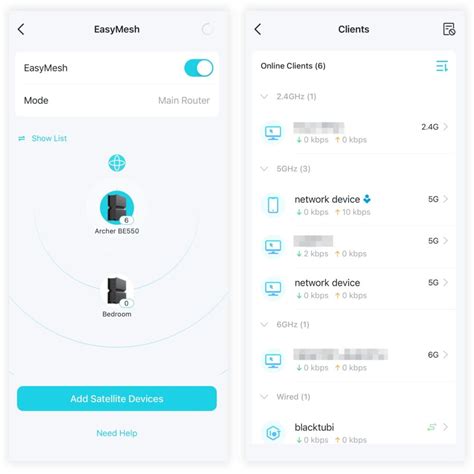
One of the most common misconceptions about Wi-Fi 7 is that it will magically extend the range of a home network. In reality, the Be550 is designed for throughput rather than extreme distance. While its 2.4 GHz band provides adequate coverage for a 2,000 to 2,500 square foot home, high-speed performance drops off quickly as you move away from the unit. The internal antenna design is sleek and aesthetically pleasing—avoiding the "over-the-top" look of many modern routers—but it can struggle with multi-floor coverage if the router is placed in a corner or a basement. Buyers with larger homes should look at the Be550 as a central hub in a potential EasyMesh system rather than a "one-and-done" solution for a massive estate.
Hardware Design and Connectivity Options
The physical design of the Archer Be550 is a departure from the traditional flat-box-with-antennas aesthetic. It stands vertically, which aids in passive cooling—a necessity for Wi-Fi 7 chips that can run quite hot during heavy data loads. The front panel includes a minimalist LED display that can show the time, weather, or even emojis, which is a polarizing feature. Some see it as a helpful status indicator, while others view it as a gimmick that adds unnecessary cost. Fortunately, it can be dimmed or turned off via the management app.
The real star of the hardware, however, is the rear I/O panel. TP-Link has been generous here, providing one 2.5 Gbps WAN port and four 2.5 Gbps LAN ports. In a market where many manufacturers still include a mix of 1G and 2.5G ports, the uniformity of 2.5G ports on the Be550 is a major selling point. This allows for a 2.5G NAS (Network Attached Storage) to communicate at full speed with a desktop PC, or for multiple rooms to be wired with high-speed backhaul for additional access points. There is also a USB 3.0 port, which is capable of basic file sharing or media server duties, though it shouldn't be expected to replace a dedicated NAS for professional workflows.
Pros and Cons
- Pro: All 2.5G Wired Ports – Most competitors at this price point offer only one or two 2.5G ports. The Be550 provides five in total, offering incredible flexibility for wired networking.
- Pro: Future-Proofing with Wi-Fi 7 – By supporting the 320 MHz channel and MLO, you are prepared for the next generation of smartphones, laptops, and tablets.
- Pro: Clean Vertical Aesthetic – The internal antenna design makes it much easier to place in a living room or on a bookshelf without it looking like industrial equipment.
- Pro: EasyMesh Compatibility – If you find dead spots, you can easily add another TP-Link EasyMesh-compatible router to create a seamless mesh network without starting from scratch.
- Pro: Solid 6 GHz Performance – The dedicated 6 GHz band provides a massive speed boost and latency reduction for supported devices, far exceeding what is possible on 5 GHz.
- Con: Limited Range on 6 GHz – Like all 6 GHz routers, the high-speed signal is easily blocked by walls and furniture, limiting the "hero speeds" to a relatively small radius.
- Con: Subscription for Advanced Security – While basic security features are included, the more robust parental controls and advanced network protection (HomeShield) require a monthly or yearly subscription fee.
- Con: Minimalist Web Interface – While the mobile app is excellent for beginners, the web-based administrative dashboard feels slightly simplified compared to more "prosumer" brands like ASUS or Ubiquiti.
- Con: Heat Generation – The unit can get noticeably warm during heavy usage, emphasizing the need for proper ventilation in its placement.
- Con: Sparse Legacy Support – While it works with older devices, the Be550 is clearly optimized for the new standard; very old 802.11n or 'g' devices may see inconsistent connectivity or require specialized settings to remain stable.
Network Comparison: Mid-Range Wi-Fi 7 Options
To put the Archer Be550 in context, it is helpful to look at how it stacks up against other typical configurations in the current market. This table compares the Be550 with a common high-end Wi-Fi 6E model and a premium flagship Wi-Fi 7 model.
| Feature | Archer Be550 (Wi-Fi 7) | Typical Wi-Fi 6E Router | Flagship Wi-Fi 7 Router |
|---|---|---|---|
| Max Theoretical Speed | 9.3 Gbps (BE9300) | 5.4 Gbps (AXE5400) | 19 Gbps (BE19000) |
| Wired Port Standard | 5 x 2.5 Gbps | 1 x 2.5G, 3 x 1G | 2 x 10G, 4 x 2.5G |
| Max Channel Width | 320 MHz | 160 MHz | 320 MHz |
| MLO Support | Yes | No | Yes |
| Common MSRP Tier | Mid-Range/Entry Wi-Fi 7 | Mid-Range Legacy | Ultra-Premium |
| Ideal Use Case | Apartments/Average Homes | Budget High-Speed | Multi-Floor Smart Mansions |
Buying Guide: Is the Archer Be550 Right for Your Home?
Deciding whether to purchase the Archer Be550 requires a honest assessment of your current hardware and your future intentions. It is not a "magic pill" for slow internet; if your ISP provides a 300 Mbps plan, a Wi-Fi 7 router will not make your web pages load faster than a standard Wi-Fi 6 router. Here are the specific categories of users who should—and should not—consider this model.
The High-Speed Wired Enthusiast
If you have a fiber optic internet connection of 2 Gbps or higher, the Archer Be550 is one of the most cost-effective ways to actually utilize that speed. Its 2.5G WAN port ensures you get what you pay for from the wall, and the four 2.5G LAN ports mean you can share that speed with a gaming PC, a console, and a workstation without any one device monopolizing the bandwidth. For this user, the Be550 is an excellent buy.
The "Vanguard" Mobile User
If you own a flagship smartphone from 2024 or later (such as the latest iPhone Pro models, Google Pixel Pro, or Samsung Galaxy S-series), you likely already have a Wi-Fi 7 radio in your pocket. The Archer Be550 is the key to unlocking the potential of those devices. Without a Wi-Fi 7 router, those multi-thousand-dollar phones are stuck using older protocols. If you pride yourself on having the latest mobile tech, the Be550 is the logical partner for your devices.
The Smart Home Architect
For those living in a "smart home" with 50 or more connected devices (bulbs, plugs, cameras, sensors), the Be550 offers a level of stability that older routers cannot match. The tri-band nature allows the router to offload the heavy data-using devices (like 4K security cameras) to the 6 GHz or 5 GHz bands, leaving the 2.4 GHz band free for simple IoT commands. This reduces the "congestion lag" that often plagues large smart home setups.
Discover deals on Electronics — updated daily.
See Deals →Who Should Wait?
If your home relies entirely on older hardware—think five-year-old laptops and mid-range tablets—the Be550 will provide very little benefit over a much cheaper Wi-Fi 6 router. Similarly, if you live in a very large home with multiple stories and thick concrete walls, a single Be550 will likely leave you with dead zones. In that case, you might be better served by a dedicated Wi-Fi 6 mesh system for the same price, which prioritizes coverage over top-end speed.
Strategic Placement and Setup Tips
To get the most out of the Archer Be550, placement is paramount. Because it uses internal antennas, it has a more spherical broadcast pattern than routers with adjustable external paddles. Ideally, it should be placed in a central, elevated location. Avoid placing it inside a media cabinet or behind a television, as the 6 GHz signal is particularly sensitive to metal and glass interference.
During the setup process via the Tether app, pay close attention to the "Channel Width" settings for the 6 GHz band. To achieve maximum performance, ensure it is set to 320 MHz. However, if you find that your connection is unstable or "flickering," dropping it back to 160 MHz may improve stability at the cost of some theoretical speed. Additionally, if you have a multi-gigabit internet plan, ensure you are using at least Cat6 or Cat6a Ethernet cables to connect your modem to the router; using an old Cat5e cable will limit your wired speed to 1 Gbps, negating one of the router’s biggest advantages.
Software and Ecosystem Considerations
TP-Link's software ecosystem is designed for ease of use. The mobile app allows for remote management, enabling you to reset the router or change the Wi-Fi password even when you are away from home. The HomeShield security suite provides an extra layer of protection by scanning for IoT vulnerabilities and blocking malicious websites at the gateway level. While the subscription model for the full suite is a "con" for some, the basic free version still provides enough utility for most users, including basic parental controls (time limits and content filtering) for a few devices.
Final Verdict
The Archer Be550 is a pivotal router because it democratizes high-end networking features that were previously inaccessible to the average consumer. By focusing on a "clean" port configuration (all 2.5G) and a streamlined design, TP-Link has created a device that appeals to both the tech enthusiast and the design-conscious homeowner. It is not the most powerful Wi-Fi 7 router on the market—that title belongs to the massive, quad-band flagships that cost three times as much—but it represents the "sweet spot" for 2026 and beyond.
The decision to buy ultimately comes down to your environment. If you are in a medium-sized home or a modern apartment and you want to ensure your 2.5 Gbps fiber link isn't wasted, the Be550 is an exceptional choice. It provides the necessary infrastructure for the Wi-Fi 7 revolution without the exorbitant "early adopter" tax of the previous year. As more devices move into the 6 GHz spectrum, the value of the Be550 will only increase, making it a rare example of hardware that actually becomes more useful as your household's device list grows. While the short range of the 6 GHz band and the subscription-based security features are valid points of criticism, they do not outweigh the sheer utility of the hardware in the right scenario. If you have the devices to support it and the internet speeds to fuel it, the Be550 is a formidable centerpiece for a modern digital home.